A free guide by Arina Tann ↗ Instagram ↗ Facebook
How to use Claude as your travel agent
I planned my last big trip with Claude and ended up with one clean page that I shared with my husband and the friend I traveled with. Below is the prompt, ready to copy, and the five things that make it work for your trip. You keep the paying and the final say. Claude takes the comparing, the scheduling and the keeping track.
6
details to give it before it plans anything
The prompt below
1
chat for the whole trip, so it remembers what you decided
How I ran mine
0
card or passport numbers it needs from you
Keep those out of the chat
Copy this
The Claude travel agent prompt
Paste this into a new chat and fill in the brackets.
Keep the whole trip in one chat so it remembers your decisions.
What you get back
The page it built for my trip
This is a piece of the trip page Claude made for me, the one I sent to my husband and my friend so we were all looking at the same plan. Booking numbers are removed. Your page will have different places on it. The shape is what to copy: one day per card, real times, and what to do next.
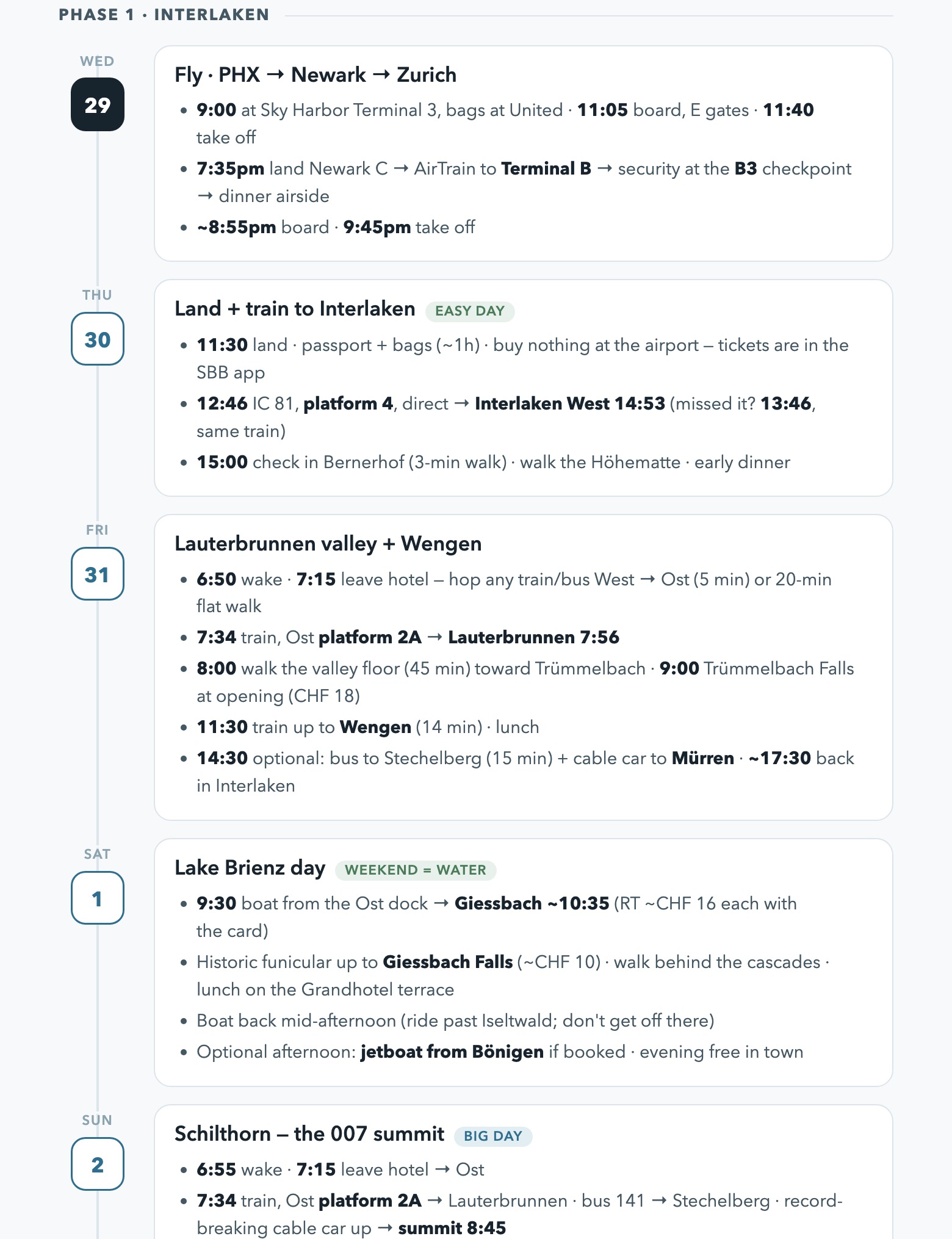
The day-by-day page from my own trip
Make it yours
Five things that make the prompt work for your trip
01
Fill in every bracket, even the awkward ones
The plan is only as good as what you tell it. Dates and who is going are the easy part. The lines people skip are budget, pace and your hard limits, and those are the ones that stop it from planning a trip for somebody else. If you hate early mornings, say so. If you will not rent a car, say so.
Paste your confirmation emails under "already booked" so it starts from what is real. Leave out card numbers and passport numbers.
02
Make it show the math on every choice
Every trip has a few "should we" questions. A rail pass or single tickets. A rental car or trains. This tour or that one. Ask for the cost both ways with the numbers shown, then a recommendation. You will see quickly which option only looks cheaper.
Type "show me the cost both ways and recommend one." Once you decide, tell it the decision is final so it stops reopening it.
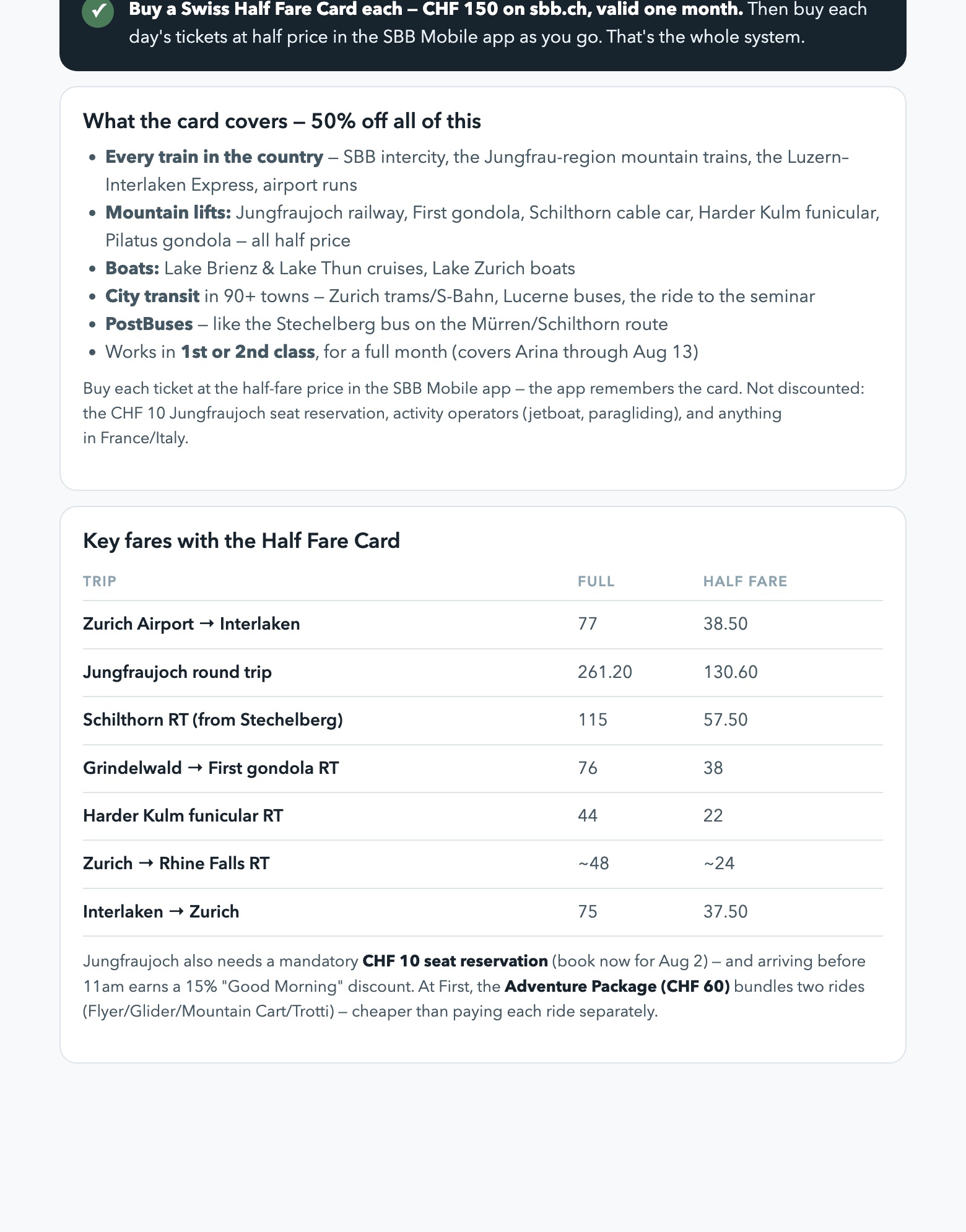
How the "math both ways" came back on my page
03
Ask for instructions with exact times
A list of ideas is no help at 9am with a suitcase. Ask for a run-sheet: which train or bus, what time it leaves, where the bags go, and when to head back. If the plan comes back cluttered with side notes, tell it to cut them and keep only what you have to do.
Type "write each day as instructions with exact times, and skip the commentary."
04
Let it draft, then you send and you pay
Have it write the reservation emails and the list of what to buy and where. You press send and you enter the card on the official site. Before you pay for anything, open the official page and confirm the price and the time, because both change.
Ask "which of these prices and times should I confirm before I pay?" and check those first.
05
Tell it the moment a plan changes
Something always moves: a flight, an event, a day you want to swap. Say what changed in one sentence and ask it to update the whole itinerary, connections included. Then ask for one page you can share, so everyone on the trip is reading the same plan.
After any change, skim the day before and the day after to make sure they still connect.
Keep your hands on these
What to keep doing yourself
Paying. Every flight, hotel and ticket goes through the official site with your own card. Checking. Confirm prices and times on the official page before you buy. Deciding. Claude recommends and you choose. If you tell it you do not want something, it should drop it and stop bringing it up.
Why a marketer is writing about travel
It is the same way I work for clients
I run Savage Social, a boutique agency in Phoenix, and this is how I use AI at work too. I give it the facts, make it show the numbers both ways, and keep the decisions and the on-camera work human. If you own a business in the Valley and want that kind of help with your content, here is how we film and post for local businesses.
Quick answers
Questions people ask
Can Claude book flights and hotels for you?
Use it for the research, the comparisons, the day-by-day plan and the email drafts, then make every payment yourself on the airline, hotel and rail websites with your own card. That keeps your card details out of the chat and keeps the final decision with you.
What should I tell Claude to plan a trip?
Give it your dates, who is traveling, what is already booked, your budget, how fast you like to move, and anything you refuse to do. Then ask it to compare your options with numbers and to write the plan as instructions with exact times. The full prompt is in this guide.
Can I trust the prices and times Claude gives me?
Treat them as a strong first draft. Prices and timetables change, so check each one on the official site before you pay or leave for the station.
The screenshots are from the trip page Claude built for my own trip, with booking numbers removed. Any prices visible in them are from July 2026 and will have changed.